


Create a job advert and review applicants
Use the workspace Jobs area to manage recruitment, rather than the candidate job-search view. Creating or changing adverts requires the relevant Jobs access.
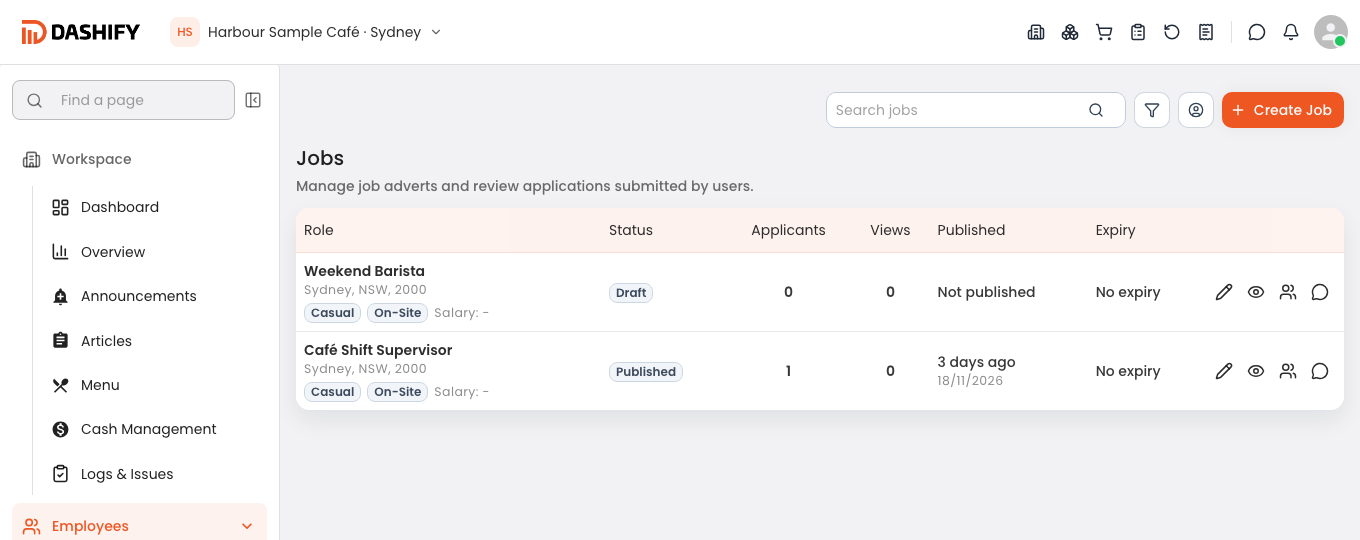
Open Jobs in the correct workspace and select Create Job.
Work through the advert wizard. Add a clear role title, location, role description and the available employment or shift requirements.
Review salary visibility and any other public-facing options. Check that the description explains the work and the candidate requirements without including internal notes.
Review the advert and select Create Job. Check its saved status; creating an advert does not mean it is published if it remains a draft.
Use the advert’s available status actions when it is ready to publish. Reopen it to confirm that the intended information is shown.
Open Applicants or the advert’s application list, filter as needed, and open a candidate to review their application, messages and status. Keep internal notes separate from messages intended for the applicant.
Before publishing or messaging
Check the business, role and candidate carefully. Recruitment records can contain personal information, so only share them with authorised colleagues. Closing an advert and changing an individual application’s status are separate actions.
Hire a weekend barista
A café manager creates an advert for a weekend barista, checks the work location and states the expected shifts. As applications arrive, they open the saved advert, review applicants against the role requirements and follow up through the available hiring workflow.