Featured app

Dashify mobile app for iOS and Android

Dashify Mobile App

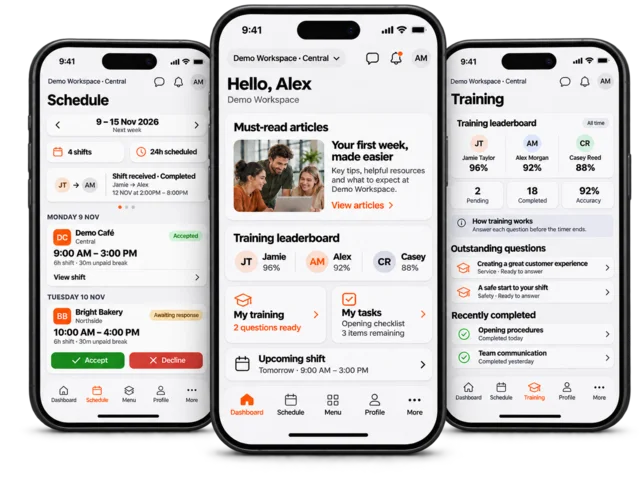
Manage the business from iOS and Android while employees handle shifts, messages, training, onboarding and profile updates.

Software key features

View all features
  • CRM & Lead Management

    Customer profiles, leads, forms, notes and follow-up in one place.

  • Online Booking System

    Guest bookings, deposits, payments, confirmations and CRM links.

  • HR Employee Management

    Onboarding, profiles, rosters, training, documents and time tracking.

  • Order & Inventory

    Stock, suppliers, sales orders, returns, reports and locations.

  • Kiosk Time Clock

    Turn a smart device into a staff time clock for shifts and breaks.

  • Custom Solutions

    Bespoke workflows, fields, approvals, reporting and integrations.
Human Resource

  • Employee Onboarding

    Paperless staff setup and approvals.

  • Employee Training

    Training, quizzes and completion tracking.

  • Job Board

    Jobs, applications and hiring workflow.

  • Staff Rostering

    Rosters, swaps and labour costs.

  • Shift Management

    Clock-ins, breaks and approvals.

Key Solutions

  • Online Reservation

    Website bookings and tables.

  • CRM Lead Capture

    Forms and enquiries into CRM.

  • Inventory Management

    Stock, locations and low inventory.

  • Order Management

    Quotes, orders, invoices and delivery.

  • B2B Marketplace

    Supplier portal for customer ordering.

  • Digital Menu

    QR menus, recipes and SOPs.

More Apps

  • Mobile App

    Admin and employee tools on mobile.

  • Time Clock App

    Kiosk time clock for staff shifts.

  • View All Solutions

    Browse every Dashify solution.

Industry examples

Dashify industry examples for retail hospitality supply and manufacturing

See Dashify by industry

Explore how Dashify can be shaped around staff, customers, stock, ordering, reporting, and operational workflows for different business types.

Industries

View all industries

Food & Hospitality

  • Bubble Tea
  • Restaurant
  • Cafe

Retail & Consumer

  • Retail

Wholesale & Supply

  • Wholesaler
  • Manufacturer
Dashify logo
  • Download Apps Mobile and kiosk apps
    • Apple DeviceDownload Dashify for iPhone and iPad.
    • Android DeviceGet Dashify from Google Play.
    • Kiosk AppClock in, training, SOPs, stock checks and tasks.
  • Features Core Dashify modules
    • All FeaturesExplore the full Dashify platform.
    • CRM & Lead ManagementProfiles, leads, forms and follow-up.
    • Booking SystemOnline bookings, deposits and confirmations.
    • Employee ManagementHR, onboarding, training and rostering.
    • Order ManagementInventory, supplier orders, sales and returns.
    • Mobile AppAdmin and employee tools on iOS and Android.
    • Custom SolutionsBespoke workflows, reports and integrations.
  • Solutions Workflows by business need
    • All SolutionsBrowse every Dashify solution.
    • Employee OnboardingPaperless employee setup and documents.
    • Employee TrainingArticles, SOPs and multiple choice quizzes.
    • Job BoardAdvertise jobs and manage applications.
    • Roster ManagementTemplates, costs, swaps and open shifts.
    • Shift ManagementClock-ins, approvals, tasks and Xero support.
    • Online ReservationBookings, table management and confirmations.
    • CRM Lead CaptureCustom forms feeding Dashify CRM.
    • Order ManagementQuotes, sales, fulfilment and returns.
    • B2B MarketplaceSupplier portal for customer ordering.
    • Inventory ManagementStock, locations, low inventory and reporting.
    • Project & TasksDaily tasks, projects, budgets and follow-up.
    • Digital MenuMenus, recipes and SOPs for teams.
    • Time Clock AppKiosk app for shifts, stock, SOPs and tasks.
  • Industries Examples by business type
    • All IndustriesSee Dashify by business type.
    • Food & Hospitality
    • Bubble Tea
    • Restaurant
    • Cafe
    • Retail & Consumer
    • Retail
    • Wholesale & Supply
    • Wholesaler
    • Manufacturer
  • PricingView plans and package options.
  • About DashifyLearn about the software and team.
  • Create AccountStart setting up your Dashify workspace.
Log In Try Dashify for free
Contact us
Help center
Dashify
  • Features
  • Solutions
  • Industries
  • Pricing
  • Contact Us
Try Demo Log In

Support Center

Go Back
Dashify Support
  • Home
  • /
  • Support
  • /
  • Human Resource
  • /
  • How To Deactivate An Existing Employee

How to deactivate an existing employee

Dashify

One connected system for the workflows that keep your business moving.

Dashify brings customer management, bookings, HR, rostering, inventory, orders, mobile teams, and custom business workflows into one flexible platform.

CRM and bookings Workforce operations Inventory and orders
Try Demo View pricing
Dashify mobile app

Run daily operations from anywhere.

Admins can manage the business on the go, while employees confirm shifts, complete training, view onboarding, message the team, and receive push notifications.

  • Push notifications
  • Team messaging
  • Face ID login
Download on the App Store Get it on Google Play

Features

  • All Features
  • Online Booking System
  • CRM Software
  • Employee Management
  • Purchase Ordering

Solutions

  • All Solutions
  • Employee Onboarding
  • Staff Rostering
  • Shift Management
  • Time Clock App
  • Online Reservation
  • Forms & Applications
  • Digital Menu
  • Custom Request

Industries

Overview

  • All Industries

Food & Hospitality

  • Bubble Tea
  • Restaurant
  • Cafe

Retail & Consumer

  • Retail

Wholesale & Supply

  • Wholesaler
  • Manufacturer

Support

  • Setup your business
  • As a Manager
  • As a Team Member
  • Kiosk and Time Clock
  • Support Center

Navigation

  • Try Dashify for free
  • About
  • Places
  • Jobs
  • Careers
  • Contact Us
  • Privacy Policy
  • Terms & Conditions

Dashify Pty Ltd. All Rights Reserved. Copyright 2026

ACN 641 617 567 | ABN 33 641 617 567

Loading, please wait...